Time theft costs U.S. businesses billions of dollars every year. But here’s the problem most managers don’t talk about openly: the way you try to stop it can be just as damaging as the theft itself. Install cameras everywhere, require constant check-ins, or demand that employees justify every minute of their day, and you end up with a workforce that feels watched rather than trusted. Morale drops. Good employees leave. And honestly, it usually doesn’t even stop the problem.
Geofencing takes a different approach. Instead of watching what employees do, it simply confirms where they are when they clock in and out. That one piece of information closes the door on the most common types of time theft without adding any friction to the workday for employees who are doing the right thing.
For organizations with field teams, construction crews, property maintenance workers, or any kind of mobile workforce, time and attendance systems with built-in geofencing are one of the most practical tools available. Here’s how it works and why it’s worth understanding.
What Is Time Theft, Really?
Time theft sounds like a dramatic phrase, but it describes something pretty ordinary. It happens when an employee is paid for time they didn’t actually work. That could mean clocking in before they’ve arrived on site, clocking out after they’ve already left, or having a coworker punch in for them when they’re running late.
The last one has its own name: buddy punching. And it’s more common than most employers realize. Research has estimated that buddy punching accounts for a significant portion of payroll losses across industries. For a team of 25 field workers, even a few minutes of inflated time per shift per person adds up to a real number by the end of the month.
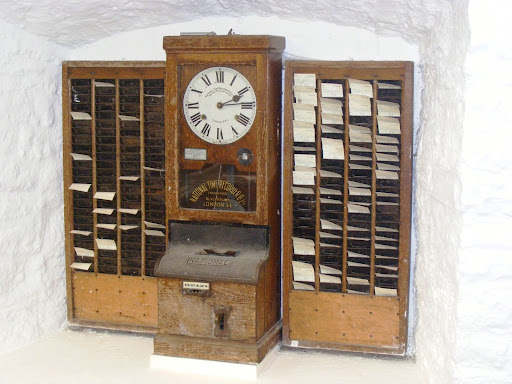
The challenge is that traditional time clocks do almost nothing to prevent this. If a physical clock is at a job site but no one is watching, any employee with access can punch in for someone else. Paper timesheets are even more vulnerable. And with remote or mobile workers, there often isn’t any physical clock at all.
How Geofencing Actually Works
A geofence is a virtual boundary drawn around a physical location. You set it using GPS coordinates, and the radius can be as tight or as wide as makes sense for the site. For a single-building office, you might draw a boundary that covers just the parking lot and entrance. For a construction site, you might need a boundary that covers several acres.
When an employee opens the mobile time tracking app on their phone, the app checks their GPS location against the defined boundary. If they’re inside it, they can clock in. If they’re not, the clock-in is blocked. Simple as that.
What makes this effective for mobile workforces is that the boundaries travel with the work. You’re not limited to one fixed location. A construction company can set up geofences for every active job site. A property management company can create boundaries around each building. A utility company can create temporary boundaries around project locations and remove them when the work is done. The system adapts to where your team is working, not the other way around.
The mobile time and attendance apps used by Ecotime include geofencing as a standard feature. Employees download the app on their personal devices or company-issued phones, managers configure the boundaries through the system, and location verification happens automatically each time someone clocks in or out.
Buddy Punching: Why This Is the Fix That Actually Works
Buddy punching is a social problem as much as a technical one. It usually isn’t malicious. An employee is running five minutes behind, texts a coworker to punch them in, and it becomes a habit. Over time, it’s just something the team does for each other.
The reason it persists is that traditional clock-in methods don’t tie identity to location. A badge can be handed off. A PIN can be shared.
Geofencing closes this gap because it requires the actual device associated with the employee to be at the location. You can’t punch in for someone from across town. You can’t clock someone out from the parking lot while they’re still inside. The location check happens automatically with every clock action, and it’s logged with a timestamp and GPS coordinates that can be reviewed later if needed.
The Privacy Question That Deserves a Real Answer
When employees hear “location tracking,” the instinct is to think their employer is watching their every move. That concern is understandable, and it’s worth addressing directly rather than brushing past it.
Geofencing in a time and attendance context is not continuous tracking. The system doesn’t record where an employee is all day, follow their route home, or log their location during lunch. It checks GPS at the moment of a clock-in or clock-out event, confirms whether the device is inside the geofence, and records that result. That’s it.
Think of it like a hotel keycard. The hotel knows which room you entered and when, not where you went inside the room or how many times you walked down the hall. The location check is a verification event, not a surveillance feed.
Being transparent with employees about how it works matters a lot here. When people understand that the system only checks location at clock-in and clock-out, and that it doesn’t track their movements otherwise, most of the resistance goes away. The employees who were already showing up on time and clocking in honestly see the system as fair. The ones who were taking advantage of a loose system feel the friction it’s designed to create.
Organizations that use employee time tracking software effectively are usually the ones that communicate clearly about how it works, why it’s there, and what it doesn’t do.
What This Looks Like for Field Teams and Construction Crews
For construction companies, geofencing solves a specific and persistent problem. Workers show up at job sites, not at a central office. There’s no one watching the clock. Supervisors are focused on the work, not on verifying that everyone arrived when they said they did.
With geofences set around each job site, workers clock in through the mobile app when they’re on location. The system logs their GPS coordinates alongside the time entry. Project managers can see in real time who’s on site, which matters for both safety and billing. And because time entries are tied to job codes, every hour is automatically allocated to the right project without anyone having to manually sort through timesheets at the end of the week.
Property management teams face a similar situation. Maintenance technicians move between dozens of properties in a single day, and verifying their location at each stop would be impossible to do manually. Geofencing handles it automatically. The system records which property the technician was at when they clocked in, ties those hours to the right building, and makes accurate cost allocation possible without any extra effort from the employee.
Utility crews, inspectors, delivery teams, home health workers, and any other group that works outside a fixed location can all benefit from the same approach. The cloud-based nature of Ecotime’s platform means the system works wherever employees are working, and managers can see what’s happening from anywhere.
Geofencing Is One Piece. Pay Rules Are the Other.
Knowing when and where someone clocked in is only the starting point. What you actually need is a system that applies the right pay rules to those hours automatically, because field employees and construction workers rarely have simple pay situations.
Think about what’s common in these environments: overtime that calculates differently depending on whether the week is a standard Monday-through-Friday schedule or something else, shift differentials for early morning or late night work, prevailing wage requirements on public projects, union contract rules that specify premium pay for certain conditions, and on-call time that carries different rates than regular hours. Manually managing all of that alongside time data from a mobile workforce is where errors multiply.
Ecotime’s system handles this through a profile-based approach. Pay rules, overtime policies, and differential rates are configured as a library of settings. Those settings are organized into profiles based on how your organization is structured. Each employee group gets assigned the profile that matches their work situation. When hours come in from the mobile app, the system applies the correct rules automatically without anyone having to calculate anything by hand.
This matters for geofencing specifically because the location of the work can affect the pay rate. Hours worked at a prevailing wage job site might calculate differently than hours at a standard commercial project. The system can handle those distinctions at the job code or project level, not just at the employee level.
What Ecotime Covers During a Demo
When organizations talk with Ecotime’s team about implementing geofencing and mobile time tracking, the conversation goes into specifics quickly. They want to understand your workforce before recommending a configuration.
For field and mobile teams, that typically means questions about how many locations you’re managing and whether they’re fixed or temporary, what overtime and differential rules apply to different employee groups, whether any of your work falls under emergency services with special pay rules, how you want job codes and project codes tied to time entries, and whether managers need real-time visibility into who’s on which site.
They’ll also talk through how different groups of employees should see their timesheets, since a construction worker’s view and a supervisor’s view are usually quite different. The goal is a configuration that fits your actual operation rather than a generic setup that requires you to work around the software’s limitations.
The Balance This Creates
There’s a version of time theft prevention that treats every employee like a suspect. Constant monitoring, frequent check-ins, documentation requirements that slow down the actual work. That approach rarely solves the problem and reliably creates new ones.
Geofencing is different because it only asks one question: are you where you said you’d be when you said you’d be there? For employees who are doing their jobs, that question answers itself instantly and without any disruption. The clock-in works, the day starts, and nothing feels different from the employee’s perspective.
For anyone trying to game the system, that question becomes an obstacle they can’t work around. And because the verification is automated rather than personal, there’s no accusatory dynamic, no uncomfortable conversations, and no manager standing at the door checking arrivals. The accountability is built into the process itself.
That’s the balance most organizations are looking for: a system that protects the business without treating employees like children. Geofencing, done right, gets you there.
Ready to See Ecotime in Action?
Ecotime’s team will walk you through exactly how geofencing, mobile clock-ins, and complex pay rules work together for your specific workforce.
Request a Demo of Ecotime Time & Attendance Software | View Demo